
A ready-to-submit casino-style Android game needs more than a working build. Before production submission, the publisher must verify the Android App Bundle, complete every relevant Play Console declaration, provide review access, and ensure the store listing accurately presents a virtual, play-money experience.
Use this checklist for social casino games that do not offer cash prizes, withdrawals, real-money wagering, or links to real-money betting. Google Play requirements change, so confirm the current listing, age, privacy, distribution, target API, and gambling-related policies before submitting.
For each item, record one of five statuses: Not started, Blocked, Ready, Submitted, or Verified.
| Sign-off area | Suggested owner | Required evidence | Status |
|---|---|---|---|
| Release AAB | Android Lead | Final bundle, version code, version name, build record | ☐ |
| Signing and integrity | Android Lead | Signing configuration and Play Console confirmation | ☐ |
| Target API and permissions | Android Lead | Build configuration and permission inventory | ☐ |
| Device compatibility | QA Lead | Supported-device test results and exclusion review | ☐ |
| Test-track evidence | QA Lead | Test build, tester list, results, and resolved defects | ☐ |
| App content declarations | Publisher | Completed Play Console forms and screenshots | ☐ |
| Content rating | Publisher / Compliance | Submitted questionnaire and assigned rating | ☐ |
| Data safety | Privacy Owner | Data inventory mapped to the declaration | ☐ |
| Privacy policy | Privacy Owner | Published URL and in-app access check | ☐ |
| Store listing | Marketing / Publisher | Approved text and final assets | ☐ |
| Products and purchases | Product / Publisher | Product catalogue and purchase-flow test | ☐ |
| Reviewer access | Publisher / QA | Working credentials and reproducible instructions | ☐ |
| Country availability | Publisher / Compliance | Approved country selection | ☐ |
| Release notes | Product / Publisher | Accurate version-specific notes | ☐ |
| Policy evidence | Compliance / Publisher | Claims-to-product verification record | ☐ |
| Production controls | Release Owner | Publishing and rollout configuration | ☐ |
| Monitoring | Engineering / QA | Dashboard access, alerts, and response owner | ☐ |
| Post-submission checks | QA / Publisher | Install, stability, listing, and feedback results | ☐ |
Validate technical build and testing
Do not begin production submission with an unverified candidate. Freeze the intended release build, identify its owner, and ensure that the tested artifact matches the bundle uploaded to Play Console.
AAB, signing and target API requirements
Complete these build checks before requesting final approval:
- Application ID: Confirm that the package name is correct and belongs to the intended Play Console app. It cannot be treated as a disposable field after publication.
- Android App Bundle: Generate the production
.aabfrom the approved source revision and build configuration. - Version code: Verify that it is valid, unique, and higher than any version already uploaded where required.
- Version name: Confirm that the user-visible version matches the release record.
- Signing: Check the selected signing key, upload key, certificate records, and Play App Signing configuration.
- Target API: Verify the current Google Play target API requirement immediately before submission. Do not rely on a previous release’s acceptance.
- Minimum Android version: Ensure the configured minimum SDK matches the supported-device plan and tested range.
- Permissions: Compare the manifest with actual product behavior. Remove unused permissions and document why every sensitive permission is necessary.
- Native libraries: Confirm that included architectures and native components match the devices the team intends to support.
- Debug configuration: Remove test endpoints, debug menus, development credentials, verbose logging, and non-production purchase settings.
- Third-party SDKs: Record the version and purpose of analytics, advertising, attribution, crash-reporting, consent, and other SDKs.
- Play Console warnings: Resolve or formally assess bundle, API, permission, integrity, and compatibility warnings.
The release record should connect the source revision, build job, AAB checksum, version identifiers, test report, and approval ticket. This prevents a last-minute rebuild from being uploaded without equivalent testing.
Internal/closed testing evidence and compatibility
Upload the candidate to the appropriate test track before production. If Play Console requires a particular testing process for the developer account, follow the requirement shown in the account rather than assuming production access is automatic.
The test evidence should cover:
- Fresh installation: Install from Google Play on an account that has never installed the app.
- Update path: Where applicable, update from the currently distributed version without losing valid local state.
- First launch: Check startup, consent prompts, age-related flows, privacy links, and required downloads.
- Core gameplay: Verify entry into the play-money game, virtual balance changes, win/loss presentation, session completion, and return navigation.
- Purchases: Test each relevant Google Play purchase flow, including success, cancellation, interruption, restoration where applicable, and delayed responses.
- Account states: Test guest, signed-in, signed-out, expired-session, restricted, and account-recovery paths that the product supports.
- Connectivity: Check slow, interrupted, and restored network conditions.
- Compatibility: Cover representative Android versions, screen sizes, memory profiles, graphics capabilities, and device categories the listing supports.
- Stability: Review crashes, application-not-responding events, startup failures, and severe gameplay defects.
- Policy-facing screens: Verify that disclosures, purchase labels, support links, and privacy information are readable and functional.
Document the device, Android version, build version, scenario, result, defect link, retest result, and tester. Any device exclusions should be intentional and recorded, not used to conceal an unexplained compatibility failure.
Populate Play Console declarations
Play Console declarations must describe the submitted build—not an earlier design document or planned future state. The Publisher should coordinate with Engineering, Product, Privacy, Monetization, and Compliance rather than answering from assumption.
App content, rating, Data safety and privacy details
Review each applicable item in the App content area:
| Play Console field | Verification question | Owner | Evidence | Status |
|---|---|---|---|---|
| App access | Can reviewers reach all relevant functionality? | Publisher | Access instructions and credentials | ☐ |
| Ads | Does the declaration match every ad placement and ad SDK? | Monetization | Placement list and SDK inventory | ☐ |
| Content rating | Do questionnaire answers reflect all gameplay and themes? | Compliance | Approved questionnaire copy | ☐ |
| Target audience | Is the selected age group consistent with content and presentation? | Product / Compliance | Audience decision record | ☐ |
| Data safety | Does the form match app and SDK collection, sharing, and security practices? | Privacy Owner | Current data-flow inventory | ☐ |
| Privacy policy | Is the page public, accurate, stable, and linked where required? | Privacy Owner | Live URL and screenshot | ☐ |
| Permissions or sensitive access | Is each declared use present and necessary? | Android Lead | Manifest-to-feature mapping | ☐ |
| Other applicable declarations | Have all Console-generated tasks been answered? | Publisher | Completed task list | ☐ |
For Data safety, inventory data by type and purpose. Include collection or sharing performed by embedded SDKs, not only data sent directly to first-party servers. Compare the declaration against runtime behavior, consent configuration, privacy policy, account flows, and deletion mechanisms that the app actually provides.
The content-rating questionnaire should be completed by someone familiar with the entire game. Consider simulated gambling presentation, mature themes, language, social features, user-generated content, advertising, and purchase mechanics where present. Save a copy of the submitted answers for later comparison.
Before approval, consult the applicable Google Play policy guidance, Play Console requirements, and content-related guidance. Confirm their current wording in case requirements have changed.
Store listing assets and in-app purchase declarations
This release check is not a full listing-production workflow. Its purpose is to confirm that the supplied listing is complete, internally consistent, and truthful.
Check the following fields and assets:
- App name, short description, and full description
- App icon, feature graphic, screenshots, and any video
- App category, tags, and contact details
- Privacy policy and support links
- Default language and approved translations
- Labels shown in screenshots, including balances and purchase prompts
- Statements about gameplay, virtual items, bonuses, or progression
Screenshots must come from representative product experiences. Do not show unavailable features or imply that virtual currency has cash value. Text and imagery must not suggest cash prizes, withdrawal, redemption, real-money wagering, or access to an external betting service.
For in-app products, compare the Play Console catalogue with the production build. Confirm product identifiers, titles, descriptions, availability, and purchase handling. The interface should make clear what the user receives. Virtual currency and items should be described as in-game content, without language that implies financial value outside the game.
Test with the intended billing configuration. Preserve evidence for product loading, checkout, cancellation, delivery, duplicate-callback handling, and recovery from interrupted transactions.
Prepare a reviewable submission
A reviewer should be able to install the app, understand its play-money scope, access gated areas, reproduce core gameplay, and inspect monetization without contacting the team for basic clarification.
Country availability, release notes and reviewer access
Select countries only after checking that the product, listing, privacy arrangements, age treatment, and distribution configuration are appropriate for each selected market. Availability should match the approved release record.
Then complete these operational fields:
- Country and region selection: Record the approved markets and the person who authorized them.
- Device availability: Review unsupported and manually excluded devices.
- Release name: Use an internal label that clearly identifies the candidate.
- Release notes: Describe material user-facing changes in the relevant languages without promotional exaggeration.
- Reviewer instructions: Provide a short, numbered path to representative gameplay, purchases, settings, privacy information, and any gated features.
- Credentials: Supply a stable review account if login is required.
- Special conditions: Explain one-time codes, server-controlled states, regional behavior, or steps needed to expose relevant functionality.
Test reviewer credentials from a clean device immediately before submission. They should not depend on an employee network, expiring personal account, pre-existing save state, or manual intervention that has not been explained.
Policy assertions and truthful product evidence
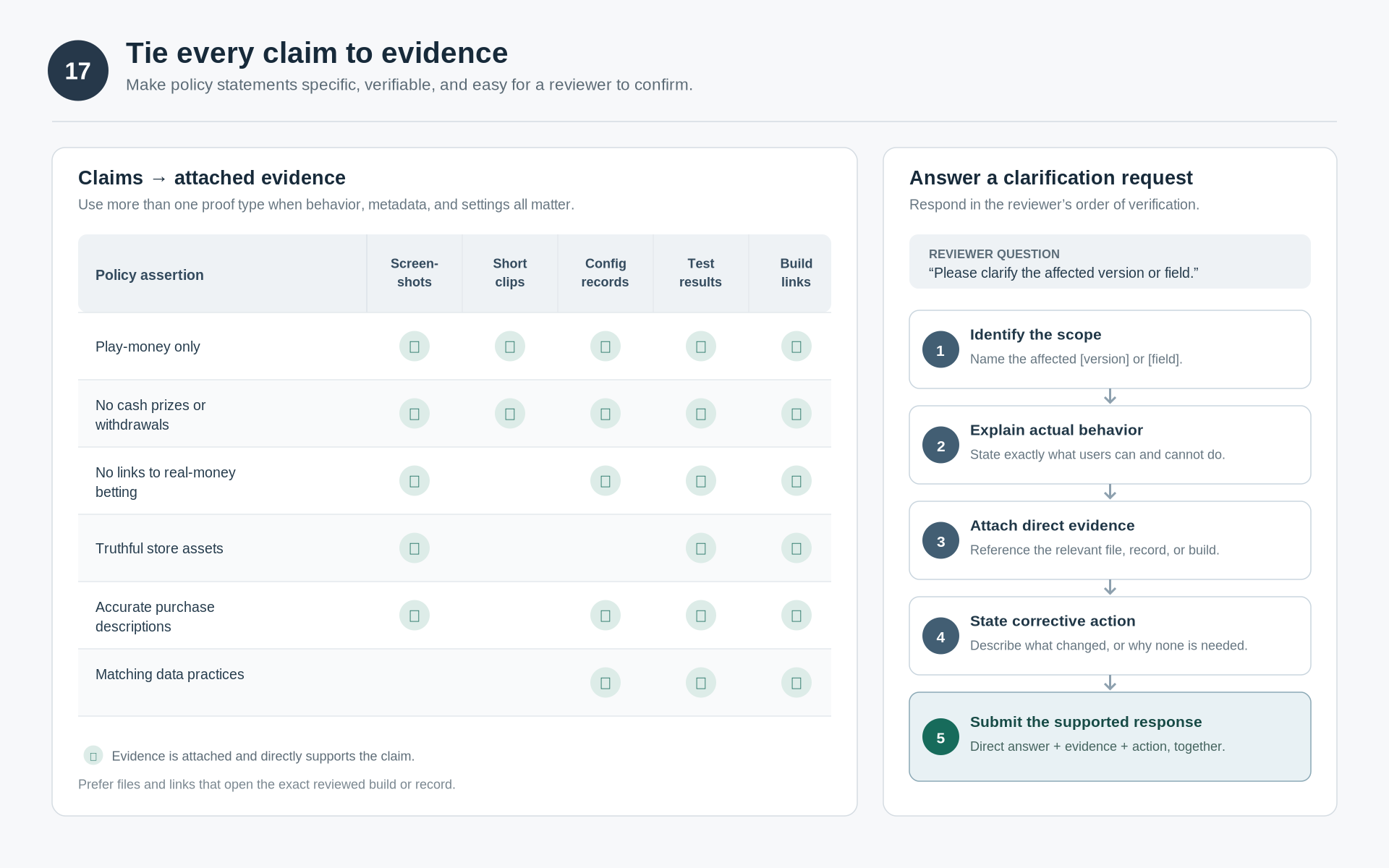
Create a compact evidence pack for statements likely to affect review. It can contain screenshots, short screen recordings, configuration records, test results, and links to the relevant build.
Verify these assertions explicitly:
- Gameplay uses virtual or play-money value only.
- The app does not provide cash prizes or withdrawals.
- The app does not direct users to real-money betting.
- Store assets match functionality available in the submitted build.
- Purchase descriptions match the items delivered.
- Ads, data practices, and permissions match their declarations.
- Age and audience selections match the app’s content and presentation.
- Reviewer access exposes the same relevant experience available to users.
If Google requests clarification, answer the specific question directly. Identify the affected version, field, or screen; explain the actual behavior; attach evidence; and state any corrective action. Do not resubmit unchanged material repeatedly without addressing the cited issue.
Manage production publishing
Production submission should have one accountable release owner. That person coordinates status checks and decisions but should not silently alter declarations or replace the approved build.
Review status, managed publishing and staged rollout
Before sending the release for review, capture a final Play Console snapshot or approval record. Confirm that no unresolved task, warning, declaration, or store change has been overlooked.
Use publishing controls deliberately:
- Check whether managed publishing is enabled and confirm who can authorize publication after approval.
- Record whether approval should publish immediately or wait for a controlled release action.
- If using a staged rollout, document the initial configuration, health checks, decision owner, and conditions for expansion or halt.
- Confirm that server configuration, game content, purchases, and support coverage are ready when users gain access.
- Avoid unrelated Console changes while the release is under review unless they are necessary and understood.
A staged rollout reduces exposure, but it does not replace testing. Its purpose is to observe production behavior before broader availability.
Ownership, monitoring and supported response options
Assign named owners for each possible outcome:
| Event | Primary owner | Required response |
|---|---|---|
| Review requests information | Publisher | Coordinate a precise, evidenced reply |
| Technical defect found | Android Lead | Assess, fix, rebuild, and retest |
| Declaration mismatch found | Privacy or Compliance Owner | Correct the field and supporting records |
| Listing issue found | Publisher | Amend the affected text or asset |
| Production stability degrades | Release Owner | Assess rollout controls and user impact |
| Policy rejection occurs | Publisher / Compliance | Read the cited reason and prepare a supported response |
Use only response options available in Play Console and applicable support channels. Keep a dated log of messages, changes, uploaded versions, and decisions so that the team can reconstruct what reviewers evaluated.
Complete post-submission checks
Submission is not the final sign-off. Verification continues after approval and again after the app becomes available to the intended production audience.
Install journey, crashes and review feedback
Run this final checklist:
- Open the live store listing from an eligible account and country.
- Confirm the app name, developer identity, descriptions, images, rating, support details, and privacy link.
- Install from Google Play on a clean supported device.
- Complete first launch, consent, sign-in, tutorial, and representative gameplay.
- Verify that virtual balances and play-money terminology are displayed correctly.
- Test production product loading and a controlled purchase flow where authorized.
- Check deep links, notifications, support links, and account controls that are in scope.
- Review crashes, application-not-responding events, startup performance, and severe functional errors.
- Monitor Play Console messages and review feedback for reproducible submission or compatibility issues.
- Record the result, owner, timestamp, evidence, and any required action.
A failed check should become an owned incident, not an informal chat message. Capture affected versions and devices, assess user impact, and use the supported Play Console response or rollout control appropriate to the situation.
For an independent field-by-field review of your build, declarations, reviewer evidence, and production configuration, get a release-readiness audit.