
Unity and Godot can both support a 2D social casino game on Android, but they suit different organizational priorities.
Unity is usually the stronger candidate when a team values established mobile tooling, broad commercial plugin coverage, access to experienced developers and vendor-provided SDK packages.
Godot is usually the stronger candidate when source access, engine-level control, a permissive open-source license and a focused 2D workflow matter more than ready-made integrations.
For a CTO or engineering lead, the decision should cover the full production system: complex UI, animation, Android builds, analytics, purchases, notifications, profiling, staffing and long-term ownership. A short technical spike followed by a weighted procurement scorecard provides a more reliable answer than a feature comparison alone.
Set evaluation criteria
Start with the product and operating model rather than a generic engine checklist. A social casino title may combine a content-heavy lobby, animated game screens, virtual currency presentation, timed events, offers, account flows and frequent live updates. These requirements create dependencies across design, engineering, QA, release management and backend services.
Define which criteria are mandatory, which are preferences and which can be addressed through custom development. At minimum, evaluate:
- 2D rendering and animation workflows
- Complex, responsive interface construction
- Existing team skills and hiring options
- Android SDK and plugin availability
- Build, deployment and profiling workflows
- Asset import and content iteration
- Source access and licensing obligations
- Performance across the target device range
- Maintenance effort over the expected product life
A capable engine can still be the wrong commercial choice if it adds integration work or requires skills the organization cannot reliably staff.
2D animation and complex UI demands
Social casino interfaces are often more layered than conventional menu-driven mobile games. One screen may contain animated symbols, counters, particle effects, pop-ups, event panels, progress meters and several responsive navigation elements.
Unity provides established systems for sprites, animation, particles and interface construction. Its component-based model is familiar to many mobile game teams, and designers can assemble screens visually. The architectural risk is allowing a large interface to become a deeply nested collection of tightly coupled objects. Test prefab organization, screen transitions, state management and localization before adopting a UI pattern.
Godot provides a dedicated 2D toolset and a node-based scene model. Its Control nodes, containers, anchors, animation tools and reusable scenes can suit interface-heavy products. The scene system can also help separate screens and widgets into modular units. Productivity still depends on whether UI and technical-art teams are comfortable with Godot’s layout model and editor conventions.
Evaluate both engines with representative screens, not only a simple reel or card table. Include:
- A content-heavy lobby with reusable tiles
- A gameplay screen with layered animation
- A modal offer or reward flow
- Dynamic values from mock service data
- Multiple Android aspect ratios
- A localization case with longer text
- One lower-end target device
The goal is to determine how quickly the team can build, revise and debug the interface patterns the product actually requires.
Team skill and plugin ecosystem
Team capability often has more influence on delivery risk than an engine’s theoretical strengths.
Unity uses C# and has a large base of developers with commercial mobile-game experience. This may make hiring, contractor selection and onboarding more predictable. Many analytics, attribution, advertising and engagement vendors also provide Unity-oriented packages or integration guidance.
Godot supports GDScript and C#, although ecosystem coverage and workflow maturity may vary by language and engine version. GDScript is closely integrated with Godot and supports rapid iteration, but adopting it can introduce training and recruitment considerations. C# may align with an existing .NET team, but every required plugin must be tested against the intended Godot version and Android export configuration.
Do not treat the existence of a plugin as evidence that an integration is production-ready. For each critical dependency, verify:
- Maintainer and release history
- Compatibility with the selected engine version
- Android architecture and build requirements
- Support for required vendor SDK versions
- Documentation and sample quality
- Upgrade and security-patch process
- Access to source code
- Responsibility if maintenance stops
Unity generally provides broader commercial middleware coverage. Godot may require more direct Android integration work, while its source access gives a capable team more control over engine behavior. Procurement must price both ecosystem convenience and the engineering responsibility created by depending on it.
Compare engineering workflows
The relevant workflow extends from a developer’s first local build to a release candidate validated by QA. Compare both engines using the same repository rules, CI environment, Android settings, test devices and sample content. This avoids comparing a polished setup in one engine with an incomplete implementation in the other.
Build speed, deployment and profiling
Measure iteration at multiple levels. Editor play-mode speed matters, but Android deployment and diagnosis often become more expensive as a project grows.
Unity offers integrated profiling tools and established Android build workflows for inspecting CPU activity, memory allocation, rendering and asset behavior. Its toolchain also includes engine, package, Android and Gradle dependencies that require coordinated upgrades.
Godot provides debugging and profiling capabilities, Android export tooling and remote deployment workflows. Its open-source engine may appeal to teams seeking transparency, but it does not automatically make every project faster to build or diagnose. Results depend on project structure, export configuration, plugins and native dependencies.
Capture comparable measurements for:
- Clean Android build duration
- Incremental build duration
- Install-and-launch time on a physical device
- Time needed to identify a scripted performance issue
- Time needed to inspect an Android-specific crash
- CI setup and maintenance effort
- Release artifact size and symbol-management process
Include a plugin-enabled build. Analytics, purchases and notifications may change Gradle dependencies, manifests and permissions, so an engine-only export does not represent the eventual release pipeline.
Asset pipelines and code ownership
Both engines support common 2D asset types, but procurement should examine how content moves from artists into a validated Android build.
Unity provides established import settings, prefab workflows and asset-management patterns. It may fit teams already using Unity-specific art, animation or editor extensions. Dependencies on proprietary project formats and engine-specific packages should still be documented, especially for a product expected to operate for years.
Godot’s scene and resource formats can support transparent, version-control-friendly workflows. Engine source access also gives engineering teams more options for debugging imports or extending the toolchain. Internal modifications, however, must be reviewed, tested and maintained through upgrades.
| Ownership area | Unity consideration | Godot consideration |
|---|---|---|
| Game code and assets | Team controls original project code and assets, subject to third-party terms | Team controls original project code and assets, subject to third-party terms |
| Engine source | Proprietary engine; access and modification rights depend on current terms | Open-source engine distributed under the MIT license |
| Plugins | Mix of vendor, commercial and community licenses | Mix of community, vendor and custom integrations |
| Custom engine changes | Constrained by available source access and licensing | Possible, but the team owns ongoing maintenance |
| Long-term obligations | Review current plans, terms and package dependencies | Track third-party licenses and maintenance of forks or native bridges |
Total ownership cost should include licensing, integration labor, CI maintenance, specialist hiring, upgrades, plugin replacement and technical support. License price alone is not a sufficient comparison. Current commercial terms should be reviewed during procurement rather than inferred from past policies.
Assess mobile and service needs
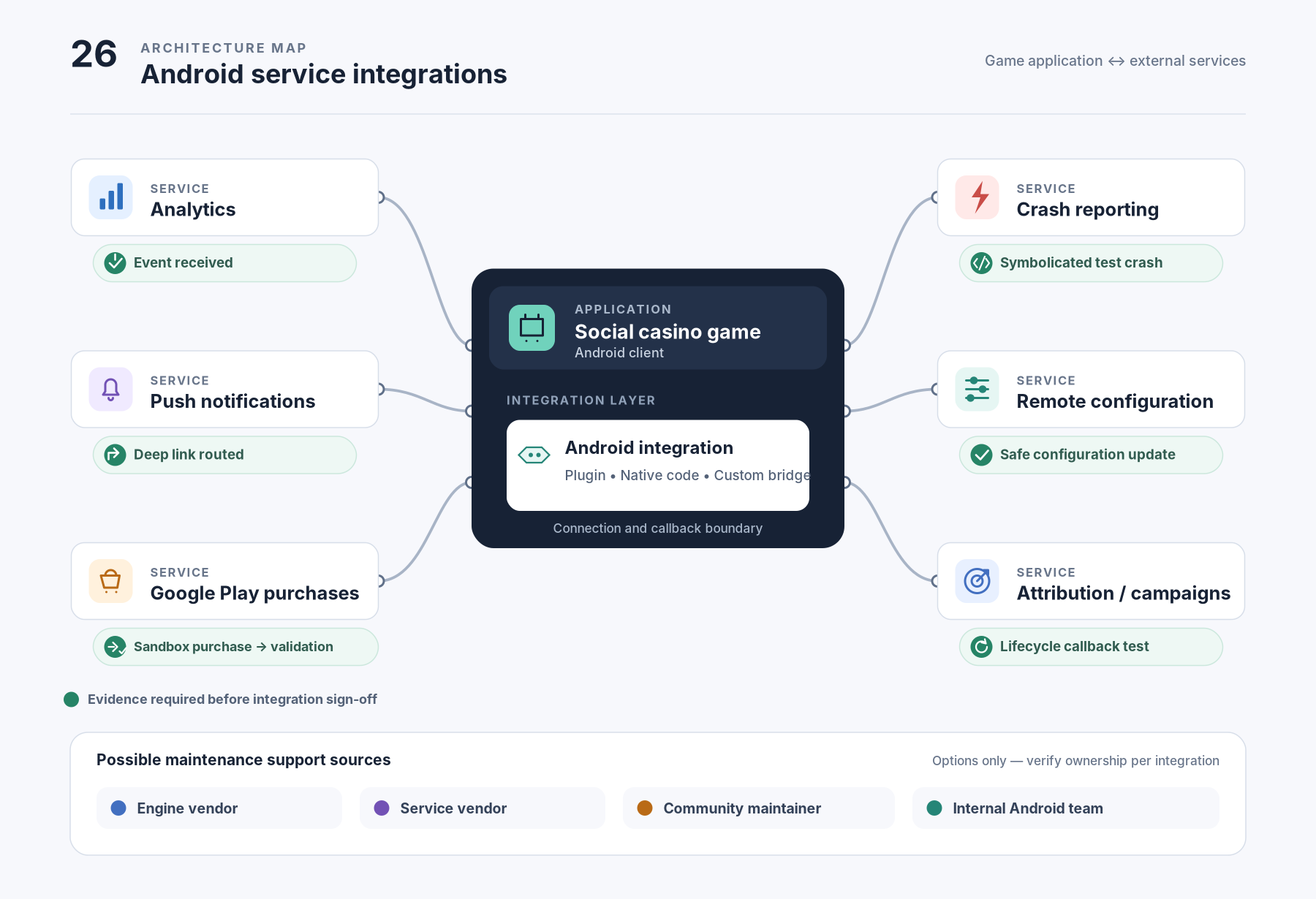
An engine decision becomes credible only after the team maps every external service needed for launch and live operation. Build an integration inventory before the technical spike so neither candidate receives an unrealistically simple test.
Analytics, notifications and in-app purchases
Analytics, push notifications and Google Play purchases connect the game to native Android services and external platforms. Unity often benefits from vendor-supplied packages and a larger pool of integration examples. Godot can support these capabilities through plugins, native Android code or custom bridges, but the organization may need to own more of the implementation and upgrade path.
Use a service matrix to define evidence:
| Service | Required capability | Evaluation evidence |
|---|---|---|
| Analytics | Events, user properties, consent-aware initialization and environment separation | Working event flow from an Android test build |
| Notifications | Permission handling, token registration and deep-link routing | Notification opens the intended screen |
| In-app purchases | Product loading, purchase flow, restoration and validation handoff | Sandbox transaction reaches the defined validation boundary |
| Crash reporting | Symbolicated Android crashes and release tagging | Test crash appears with usable diagnostic context |
| Remote configuration | Safe defaults, fetch behavior and environment controls | Configuration change updates a non-critical feature |
| Attribution or campaigns | Required links and lifecycle callbacks | Documented test using the selected provider |
The spike does not need to complete the production service architecture. It must reveal dependency conflicts, missing capabilities and ownership gaps. Record whether support comes from the engine vendor, service vendor, a community maintainer or the internal Android team.
Performance on lower-end Android phones
Neither engine should be declared faster based on reputation or a minimal demo. Performance depends on rendering choices, animation complexity, texture use, scripting behavior, plugins and target hardware.
Use the same representative scene, assets and service integrations for both candidates. Compare:
- Frame-time stability during animation-heavy sequences
- Peak and steady-state memory use
- Application startup time
- Scene or screen transition time
- Package and installed size
- Thermal behavior during a defined test session
- Recovery behavior under memory pressure
If one candidate misses a target, determine whether the limitation is intrinsic, caused by the prototype architecture or likely to be resolved through ordinary project work. Results requiring extensive custom optimization should be reflected in delivery risk and total ownership cost.
Run a technical spike
A technical spike converts assumptions into comparable evidence. Keep the scope narrow enough to finish but broad enough to exercise the highest-risk production requirements. Both implementations should use the same acceptance criteria and receive review from engineering, QA, technical art and release stakeholders.
Prototype scenarios and measurement
Run the spike as a controlled procurement exercise:
- Define the target environment. Select engine versions, Android API requirements, device tiers, build infrastructure and mandatory services.
- Build a representative vertical slice. Include a lobby, one animated game screen, a modal flow and dynamic mock data.
- Integrate critical services. Add an analytics flow, a notification path and a purchase sandbox or equivalent integration boundary.
- Create release builds. Produce signed test artifacts through the intended CI path rather than relying only on editor exports.
- Test target devices. Use identical scenarios and session lengths across both engines.
- Measure engineering effort. Record setup time, implementation time, build failures, workarounds and specialist involvement.
- Review maintainability. Ask another engineer to navigate, modify and rebuild each prototype.
- Document unresolved risk. Separate confirmed limitations from questions requiring vendor or legal review.
Avoid scoring visual polish unless the production art workflow is itself a criterion. The spike should reveal technical and operational differences, not reward the prototype that received more refinement time.
Decision scorecard for procurement
Use a weighted engine decision table to prevent one attractive feature from dominating the result. Adjust the weights before testing so they reflect business priorities rather than observed outcomes.
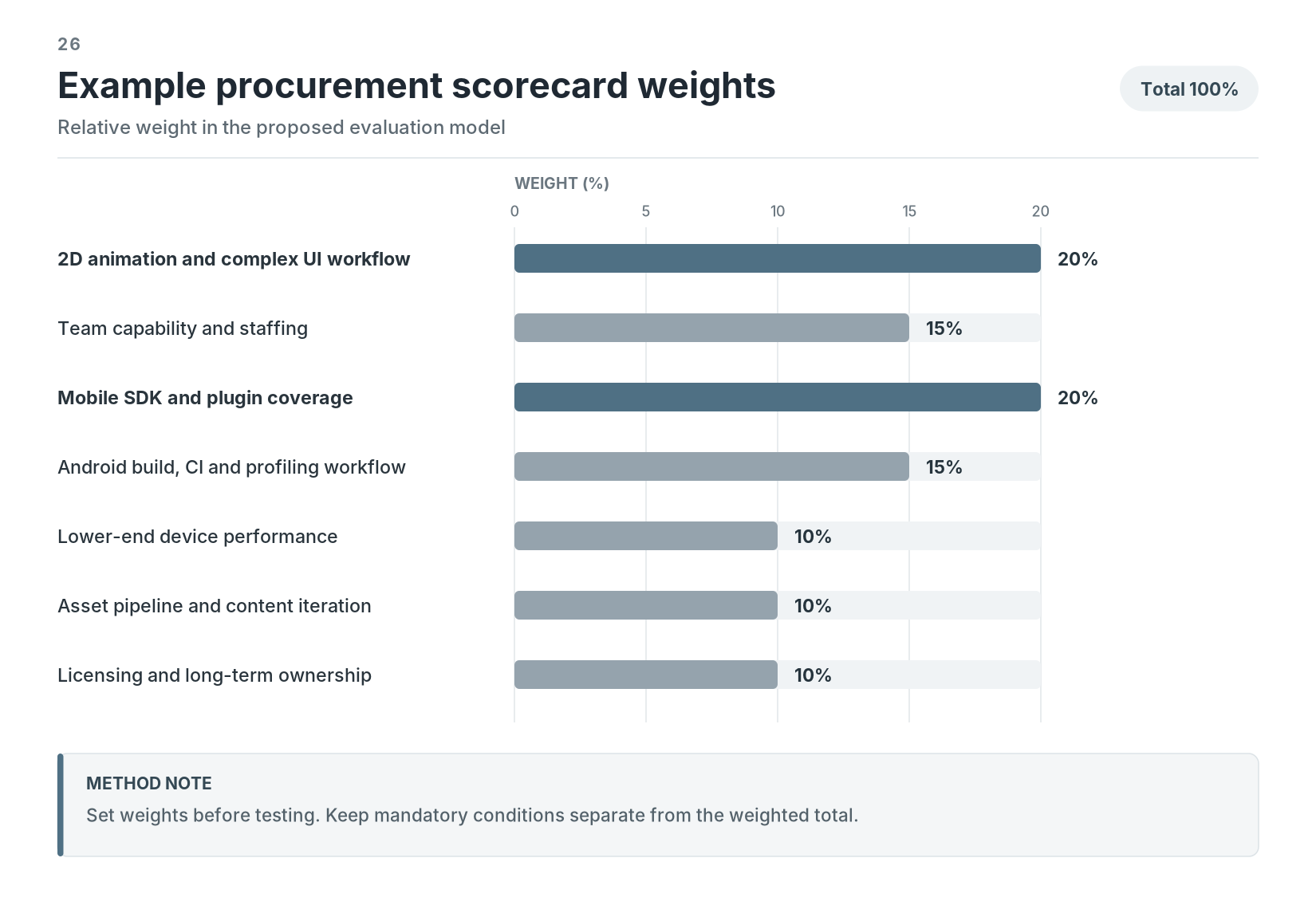
| Decision criterion | Weight | Evidence required | Unity score (1–5) | Godot score (1–5) |
|---|---|---|---|---|
| 2D animation and complex UI workflow | 20% | Delivery time, revision effort and reviewer feedback | — | — |
| Team capability and staffing | 15% | Skills inventory, onboarding estimate and hiring assessment | — | — |
| Mobile SDK and plugin coverage | 20% | Working integrations and maintenance ownership | — | — |
| Android build, CI and profiling workflow | 15% | Build measurements, diagnostics and pipeline review | — | — |
| Lower-end device performance | 10% | Device results using equivalent scenarios | — | — |
| Asset pipeline and content iteration | 10% | Import, revision and version-control assessment | — | — |
| Licensing and long-term ownership | 10% | Current legal review and five-year maintenance model | — | — |
| Total | 100% | Sum of each rating multiplied by its weight | — | — |
Require a written justification for every score. Flag non-negotiable conditions separately: a high total cannot compensate for a missing mandatory SDK, an unacceptable legal term or a release pipeline the organization cannot support.
The final decision should explain not only which engine scored higher, but why the organization is equipped to own that stack. For an evidence-based review of integrations, Android delivery and maintenance responsibilities, review your Android tech stack with an Android game development team.